The best photo from your run is rarely a map. It’s the fog on the lake at kilometre three, the view from the top of the hill, or the post-run grin on a bridge.
iRunning’s transparent overlays let you keep that photo and still show the numbers. Each overlay is just your stats and route on a see-through background, so your photo shows through everywhere else. Paste it on top in Instagram Stories and you’re done.

How to do it

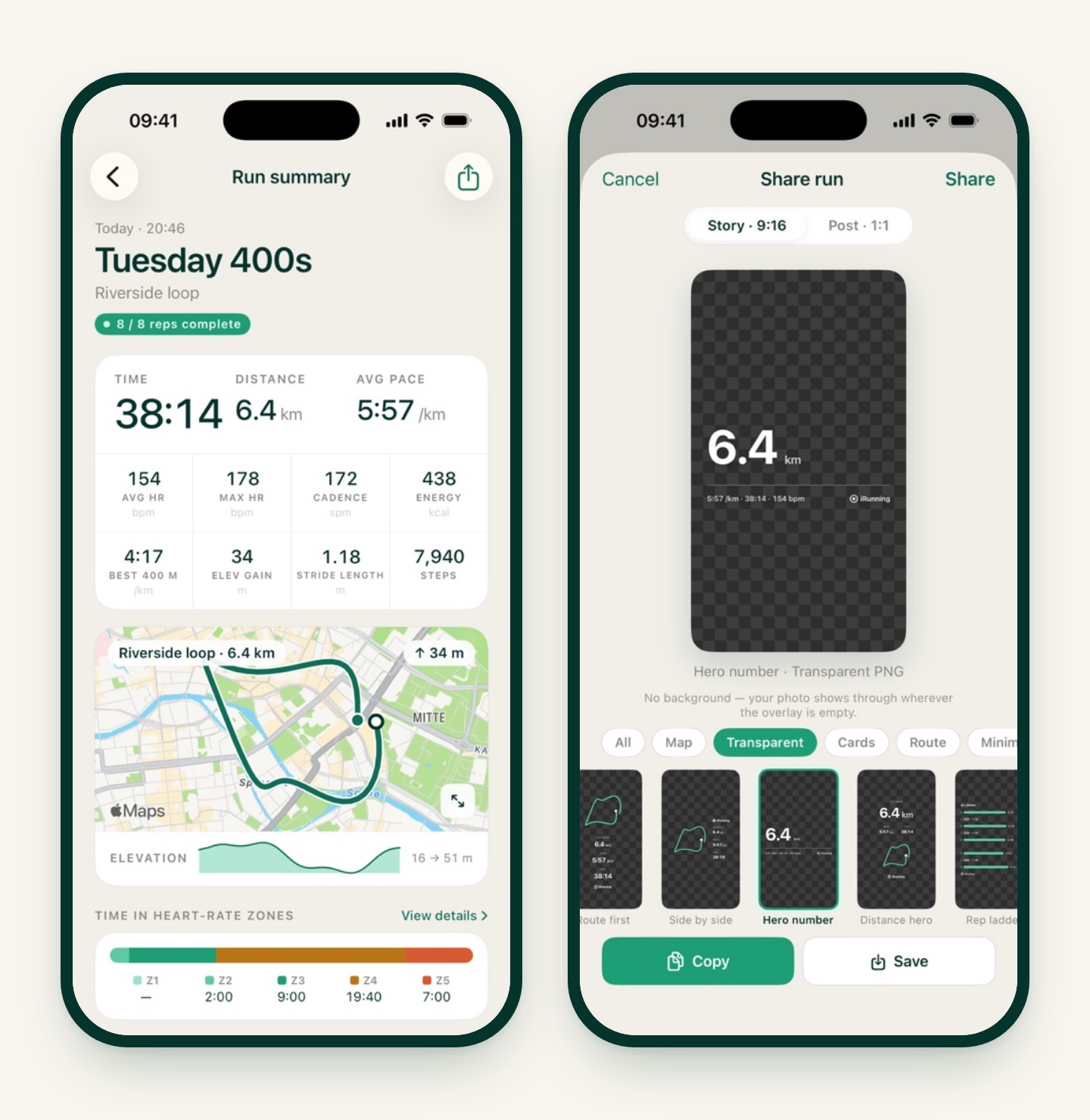
- Open the run. Go to History, tap your run, then tap Share. If you’re asked where to share, choose Image.
- Pick an overlay. Keep the format on Story · 9:16, tap the Transparent filter, and swipe through the designs. The preview shows a checkerboard wherever the overlay is see-through.
- Tap Copy. The overlay goes to your clipboard as a transparent PNG at full story resolution, 1080 × 1920.
- Paste it on your photo. In Instagram, start a new story with your photo as the background, then paste the copied overlay as a sticker. Pinch to resize and drag it wherever the photo has room.
Other ways to use them:
- Save puts the overlay in Photos, handy if you’re editing later.
- Share (top right) sends the PNG file to any app, such as Canva, CapCut or a messaging app. Sending the file keeps the transparent background intact.
Transparent overlays are story-format only, and every one of them is free.
17 designs, and when to use each
Not every overlay suits every run. Some only appear when the run has the data they need, so a run without GPS won’t offer the route designs, and a run without a heart-rate source won’t offer the heart-rate ones.
Simple and clean: for any run
| Overlay | What it shows | Good for |
|---|---|---|
| Centre stack | Distance, pace and time stacked, with the route below | Photos with a calm centre, like sky or water |
| Ledger | The three stats flush left with thin dividers | Busy photos. It hugs one edge |
| Classic row | Distance, pace and time side by side | Keeping the photo the star |
| Five stats | Adds elevation gain and calories | When the climb is the story |
| Hero number | Distance huge, pace, time and heart rate underneath | A milestone: first 10K, longest run |
| Distance hero | Big distance, pace and time, route below | Same idea, a little calmer |
| Edge rail | The stats rotated up the left edge | Portraits where the middle is taken |
| Terminal log | Monospace readout: distance, pace, moving and elapsed time, heart rate | Runners who think in data |
Route-led: needs GPS
| Overlay | What it shows |
|---|---|
| Route first | Your route large, stats as a caption |
| Side by side | Route on the left, stats on the right |
Heart rate: needs an Apple Watch or a chest strap
| Overlay | What it shows |
|---|---|
| HR route | Your route coloured by heart-rate zone, with average and max heart rate |
| HR trace | Zone-coloured route plus a heart-rate sparkline |
| Zone bars | Time in each zone as bars |
| Zone split | Time in zones, hottest first, with a grid of stats |
| HR ticker | A thin zone route with a one-line heart-rate summary |
Interval workouts: needs a structured session
| Overlay | What it shows |
|---|---|
| Rep ladder | A bar for every rep and recovery, with its pace, like 8 × 400m |
| Workout card | Workout name, reps completed and your best rep |
Walks get the same designs, with steps in place of pace where it makes sense.
Tips for photos that work
- Leave space when you take the photo. Frame with sky, water, road or grass above or below your subject. That’s where the numbers go.
- Dark backgrounds win. Overlays use white type with a soft shadow, so they read best on dusk skies, shaded trails, night streets and deep water. Bright snow, a white wall or a hazy midday sky will wash them out; if that’s the shot you have, pick a spot in the photo that’s darker, or turn the photo’s exposure down a touch first.
- Match the overlay to the run. Rep ladder for interval sessions, HR route when heart rate is the point, Hero number for a distance you’re proud of.
- Resize, don’t crowd. Pinch the overlay down to leave the photo breathing room. It’s a full-resolution PNG, so it stays sharp at any size.