
Most training plans don’t fail on the hard days. They fail on a Tuesday when work runs late, a Thursday with a sore throat, and a weekend that quietly turns into a week off. Then the app shows a wall of red, and the plan is over.
iRunning’s plans are built on a different assumption: you will miss sessions. Every plan page says so, in the section called “If life gets in the way”: a missed run is not a reset. Here’s what that means in practice, situation by situation.
You missed one session
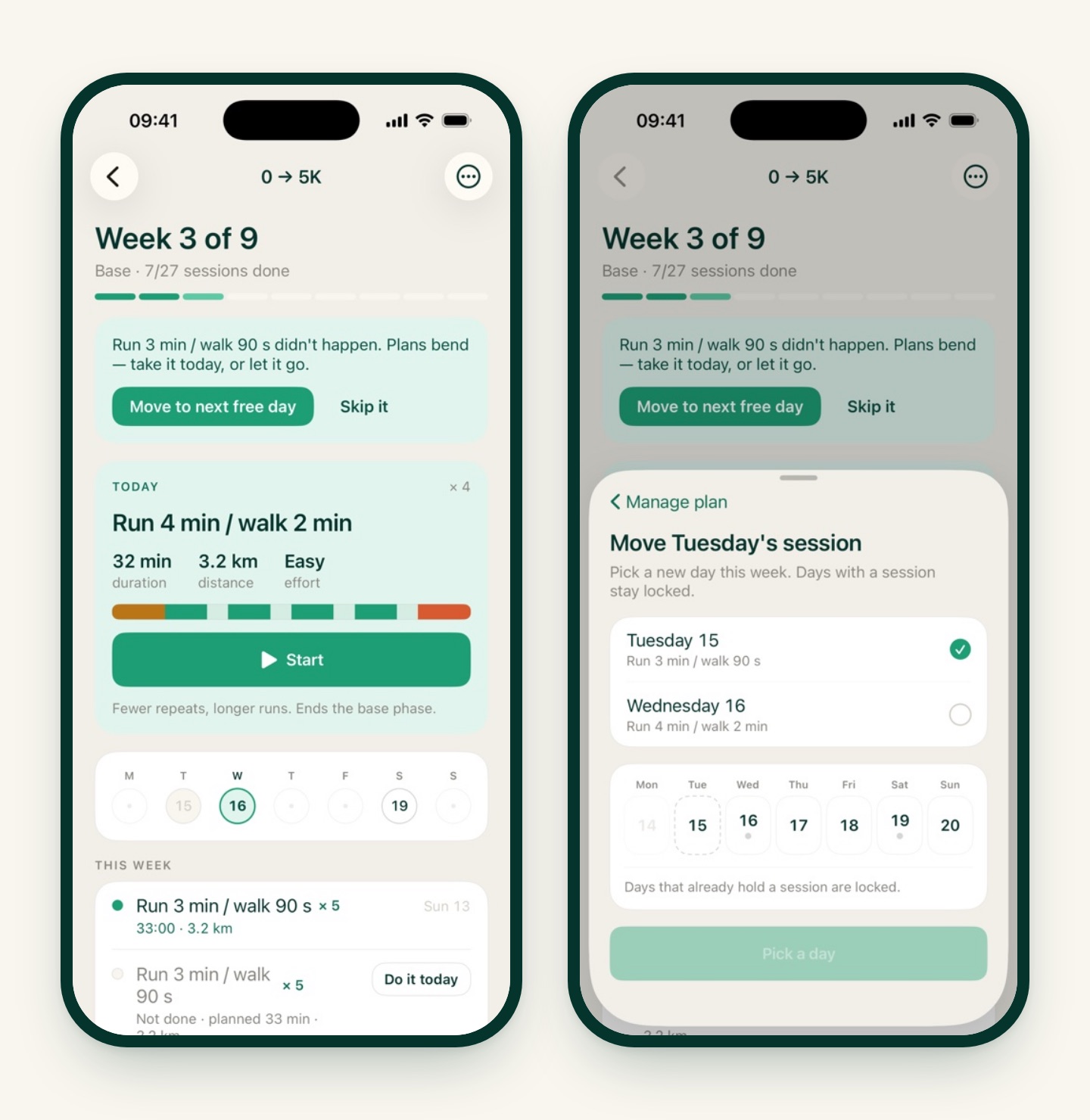
Nothing to do. The next time you open the plan, a banner says the session didn’t happen and offers two choices:
- Do it today (or Move to next free day, if today already has its own session). The run slides forward; the rest of the week stays put.
- Skip it. The session is marked skipped and the plan carries on. No penalty, no catch-up week.
If you’d rather decide in advance, Move a session in the ••• menu lets you drag any upcoming run to another day in the same week. Days that already hold a session stay locked, so two runs never land on one day.
Your week changed
New shift pattern, kids’ schedule, a standing Tuesday commitment: open Change training days and pick the days that work now. Sessions land on the new days from this week on.
You were sick, or away for a while
This is the one most apps get wrong. Missing a week of a 9-week plan shouldn’t mean five red sessions and a shrug.
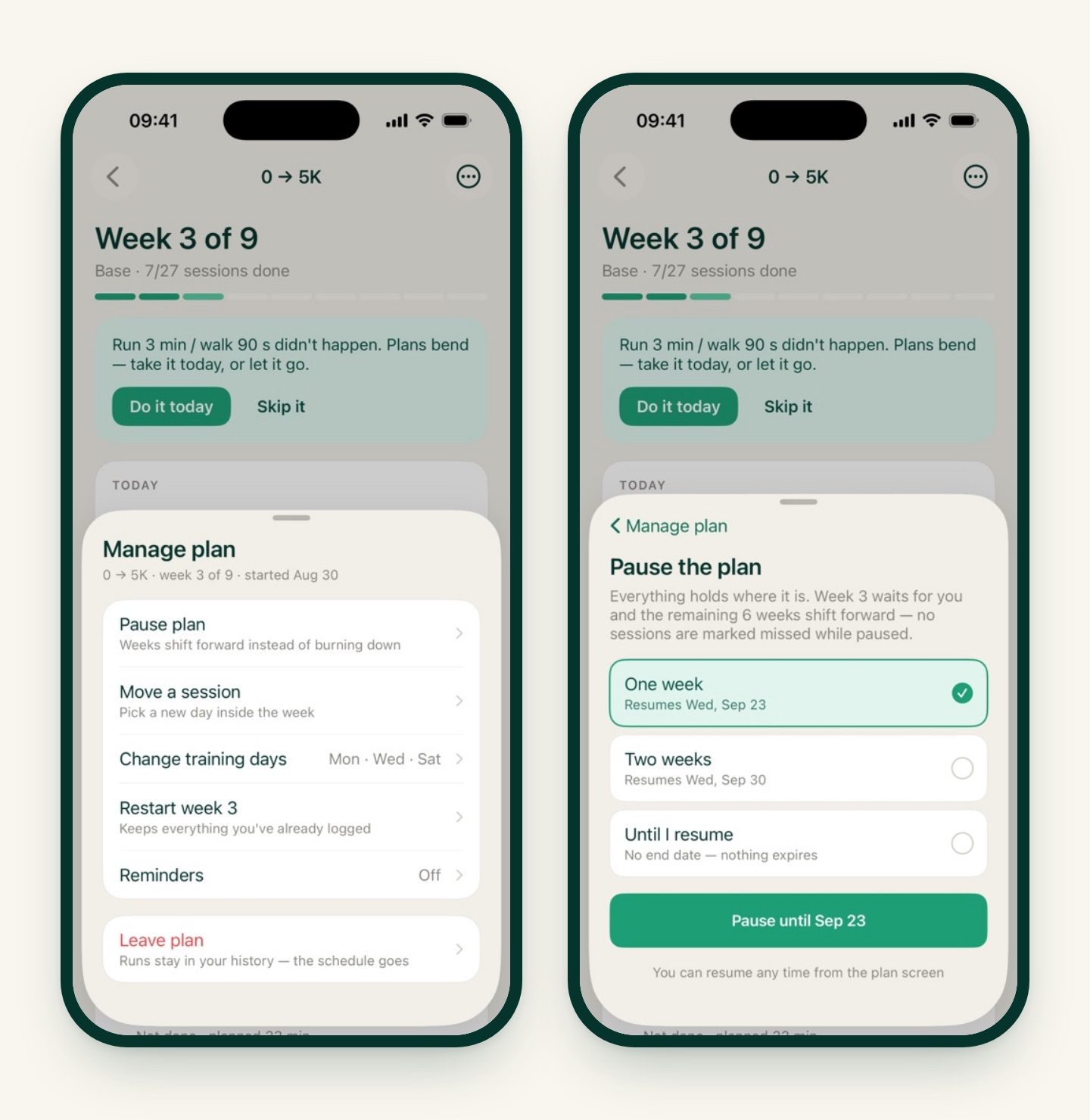
Pause plan freezes everything where it is. Pick One week, Two weeks, or Until I resume:
- The current week waits for you and the remaining weeks shift forward. No session is marked missed while paused.
- With a one- or two-week pause, the plan resumes on its own on the date shown. You can also resume earlier from the plan screen.
- “Until I resume” has no end date. Nothing expires.
Forgot to pause and came back after a gap? iRunning notices and suggests going back: Continue from week N (one week earlier, to ease back in) or Keep week N (carry on where the plan stopped). Pick whichever matches how you feel.
You had a bad week
Sometimes you made it to one run out of four, and the honest move is to do the week again. Restart week N offers two ways:
- Repeat week N: the same sessions again, starting from today. Everything after shifts later, and the plan’s finish date moves with it.
- Only redo what I missed: just the skipped sessions get new days this week; what you did stays done.
Either way, everything you’ve already logged is kept. Restarting a week never deletes a run. And if you change your mind, there’s an Undo.

You want out
Leave plan ends the schedule. Your runs stay in History, your streaks and totals are untouched, and the plan is still in the catalog if you want to start it again later. Only one plan runs at a time, so starting a different plan will ask whether to pause or end the current one.
Things the plan does on its own
- It matches runs to sessions. Finish any run and iRunning checks whether it fits today’s session. You don’t have to start the run from the plan screen for it to count. Runs imported from Apple Health count too.
- It reminds you, if you want. Under Reminders you can turn on a notification on the morning of a session, the night before, or both. They’re per plan and never fire on rest days.
- It shows today’s session on Home and in the widget, so the plan is one tap away without opening the plan screen.
What it doesn’t do
The plan won’t rewrite itself because a run felt hard. After a session you can say whether it felt too easy, just right or too hard, and that’s useful to look back on, but the weeks stay as designed. If a plan really doesn’t fit, the honest tools are the ones above: step back a week, or pick a different plan from the catalog.
The short version
| What happened | Press this |
|---|---|
| Missed one run | The banner: Do it today or Skip it |
| Can’t run on the planned day | Move a session |
| Schedule changed for good | Change training days |
| Sick or travelling | Pause plan, one or two weeks, or until you’re back |
| Mostly missed a week | Restart week, all of it or just the missed runs |
| Done with this plan | Leave plan; your runs stay |
A plan is a shape, not a contract. Bend it, and keep going.