iRunning 1.2.2 is rolling out on the App Store. It’s the biggest update since training plans arrived, and most of it came from the same place as always: your feedback.
Turn your run into a video
Share › Video replays your route as an animated clip, with distance, pace, time and heart rate counting up as the dot moves. Five overlay styles, story or portrait format, a light, dark or satellite map, an optional 3D view, and a camera that follows you. Save it to Photos, or hand it straight to Instagram Stories or TikTok.
It’s free for everyone. No subscription needed.

There’s a still version too: map photos put your route and stats on a map image in the same five styles, in Share › Image under the Map filter.
The full walkthrough is in Turn Your Run Into a Video for Instagram Stories and TikTok.
20 new training plans
The catalog goes from 21 plans to 41. The headline group is Chase a time: four plans with one number on them.
- Sub-30 5K, Sub-60 10K, Sub-2h Half Marathon, Sub-4 Marathon: fixed goal, fixed paces, reps a touch under goal pace, tempos a touch over, and a time trial at the end.
Two groups are entirely new: Hiking & rucking (Rucking: First 8 Weeks, Trek Ready) and After 50 (First 5K After 50, Strong Runs at 50+). And spread across the others: Japanese Walking, Walk a Half Marathon, First 15K / 10-Miler, Run-Walk Half Marathon, First 50K, Faster Mile, Fitness Race 8 × 1 km, Zone 2 Base Builder, The 30-Minute Runner, 28-Day Streak, Postnatal Return to Running and 12-3-30 Incline Walk.
We’ve started writing about them: Sub-30 5K, Japanese Walking and Zone 2 Base Builder each have their own guide.
Dark mode
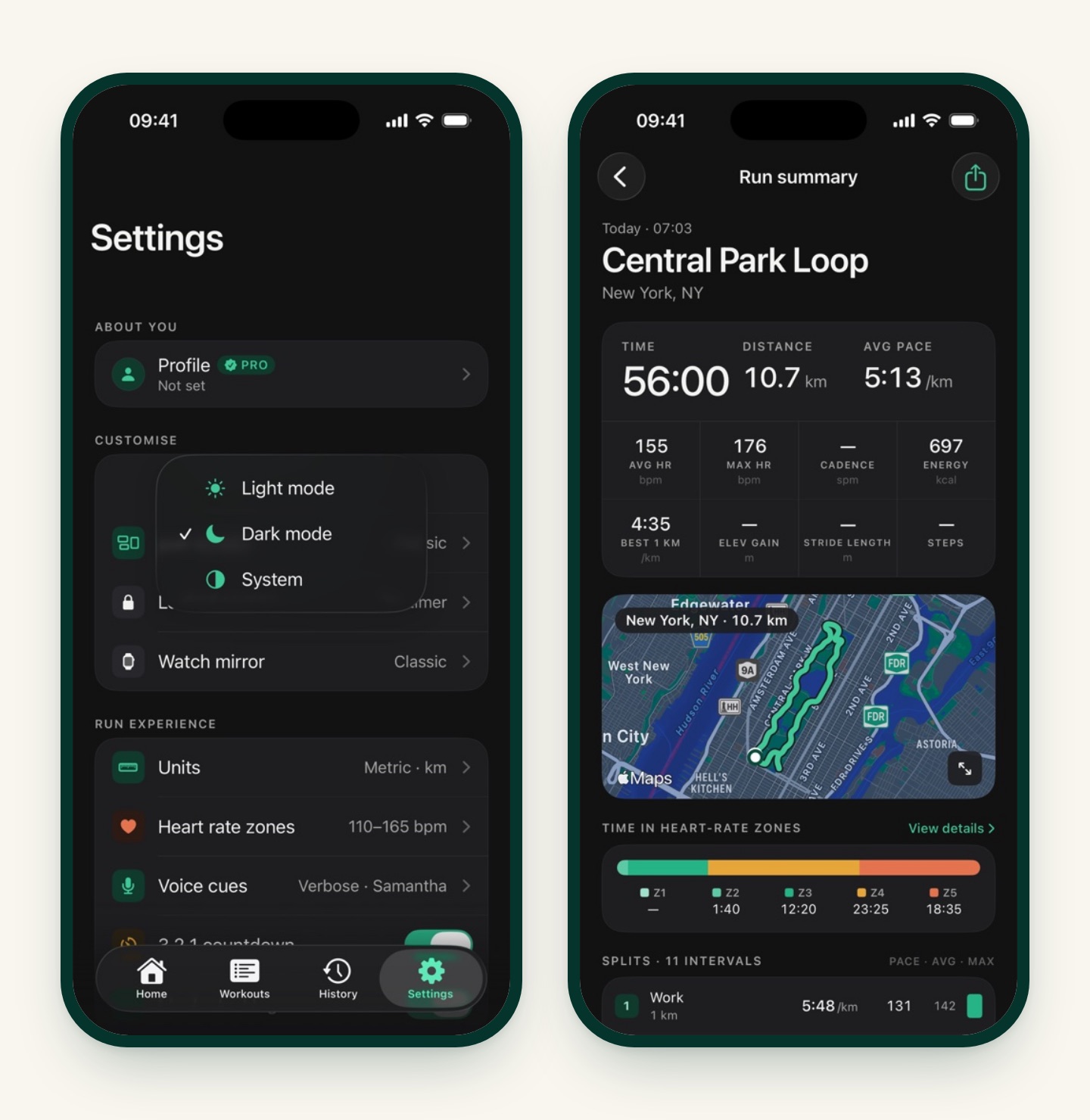
Long requested, finally here. Settings › Customise › Appearance offers Light, Dark or System. The app stays daylight-first by default; switch to Dark or System if you run at night or just prefer it.
Smarter tracking
- Indoor or outdoor. Pick Indoor on the workout screen before a treadmill run. The app skips GPS and saves the workout to Apple Health as an indoor run. Time-based intervals, voice cues, heart rate and cadence all work as usual. See Treadmill Intervals That Don’t Feel Like a Hamster Wheel.
- Runs and walks are told apart automatically, from your cadence and speed, so each workout lands in Apple Health as the right type even if you started a “run” and walked it.
- Re-sync with Health. Edited a run that’s already in Apple Health? Open it and tap the “Saved to Health” pill to rewrite it with the latest data. This applies to runs iRunning saved itself; runs imported from Health belong to their original app.
Export many runs at once
In History, long-press a run, tap Select, pick as many as you like, and export them together as FIT or GPX. Two or more runs come as a single ZIP. Batch export is part of iRunning Premium, like the single-run GPX and FIT export.
Also in this release
- iCloud sync has its own switch in Settings › Devices. It’s off until you turn it on, and it’s part of Premium. If you were syncing before, flip it back on after updating.
- Polish across the run screens, History and plans.
Fixed
- Pace targets and pace alerts now display correctly in miles.
- A run whose workout you deleted in the Apple Health app can be saved to Health again.
How to get it
Update to iRunning 1.2.2 on the App Store. Then open a recent run, tap Share, and try Video. We’d love to see what you make.
Thanks for the feedback that shaped this release. Keep it coming.